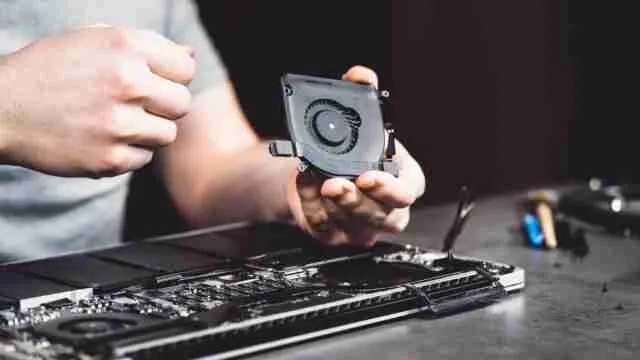
Have you ever switched on your laptop and felt like it was about to take off like an airplane? A loud fan can be bad, but it is usually your laptop's way of saying it is working too hard or getting too hot. Sometimes the fix is as simple as cleaning out dust or closing heavy apps. Other times, the noise is a warning that your laptop is getting old and struggling to keep up. In this article, we will explain why laptop fans become so loud, what you can do to reduce the noise, and when it makes more sense to upgrade instead of repairing.
The Anatomy of a Loud Laptop Fan: What's Really Going On?
A laptop fan has one simple job: keep the system cool. Every time you browse the web, watch videos, edit photos, or play games, your processor and graphics chip generate heat. The fan pulls in cool air and pushes hot air out to stop these parts from overheating.
A little fan noise is completely normal. In fact, it often means the cooling system is doing exactly what it should. The problem starts when the fan suddenly becomes much louder than usual, keeps spinning at full speed even during light tasks, or sounds different from how it used to.
In most cases, the fan is reacting to something rather than causing the problem. Your laptop is simply trying harder to control rising temperatures.
Some of the most common reasons include:
- Too many apps running together: Multiple browser tabs, background software, or large downloads can keep the processor busy, making it produce more heat.
- Dust blocking airflow: Over time, dust settles inside the vents and around the fan, making it harder for hot air to escape.
- Poor ventilation: Using your laptop on a bed, pillow, or blanket blocks the air vents, forcing the fan to work much harder.
- Heavy workloads: Video editing, gaming, coding, and other demanding tasks naturally increase fan speed because the hardware is under more pressure.
- Ageing hardware: As laptops get older, cooling systems become less efficient. Even everyday tasks may cause the fan to spin faster than before.
DIY Fixes: Simple Steps to Silence Your Laptop Fan
A noisy fan does not always mean your laptop needs repairing. In many cases, a few simple steps can reduce the noise and improve cooling.
- Clean the vents: Remove dust with compressed air to improve airflow.
- Close unused apps: Fewer background programs mean less heat.
- Use a hard surface: Keep the laptop on a desk or table so the vents stay open.
- Restart the laptop: This clears unnecessary processes that may be using system resources.
- Update your software: System and driver updates can improve performance and cooling.
- Choose Balanced power mode: It reduces unnecessary strain during everyday use.
If the fan is still loud after trying these fixes, the problem may be related to ageing hardware or a failing cooling system.
Before You Upgrade: What Makes a Good Laptop Today?
If you have decided it is time for a new laptop, focus on features that will serve you well for the next few years rather than just looking at the lowest price.
Here are a few things worth checking:
- A modern processor for smoother everyday performance and better multitasking.
- At least 16GB RAM if you regularly work with multiple apps or browser tabs.
- An SSD for faster boot times and quicker file access.
- Good cooling to keep the laptop running quietly under load.
- A Full HD or better display for a more comfortable viewing experience.
- Long battery life if you often work or study away from a power outlet.
- Enough ports for your accessories, without relying on extra adapters.
Choosing a laptop with these essentials can give you better performance, quieter operation, and a device
Laptop Cooling Pads: Worth It or Just Another Accessory?
A laptop cooling pad can help, but it is not a magic fix. If your laptop gets warm during gaming, video editing, or long work sessions, the extra airflow from a cooling pad may lower temperatures and reduce how often the fan runs at full speed.
However, if the real problem is dust, blocked vents, or an ageing fan, a cooling pad will not solve
it. It can only assist the cooling system, not replace it.
If you regularly use your laptop for demanding tasks or work for hours at a stretch, a cooling pad is a useful accessory. But if your fan has suddenly become loud without any obvious reason, it is better to identify the actual cause before spending money on one.
Conclusion
A loud laptop fan is usually a warning, not the actual problem. In many cases, a little cleaning, better airflow, or closing unnecessary apps is enough to fix it. But if the noise continues even after trying these steps, your laptop may simply be reaching the end of its useful life. Instead of ignoring it, treat it as a sign to check your system's health. A timely upgrade can save you from bigger issues and give you a faster, quieter, and more reliable experience.
Read more:
Disclaimer: At Jagran Reviews, we prioritize providing up-to-date information on the latest trending commodities and goods. Links in this article are affiliate links. Please note that our product recommendations are based on independent research and analysis however, Jagran Reviews shall not be held liable for any claims, damages, or disputes arising under applicable laws, including the Consumer Protection Act, 2019. Any issues regarding product quality, delivery, or warranties must be directed to the respective manufacturer or seller. Furthermore, the products featured in this article are organized for reader convenience and are listed in no particular order of priority or ranking.