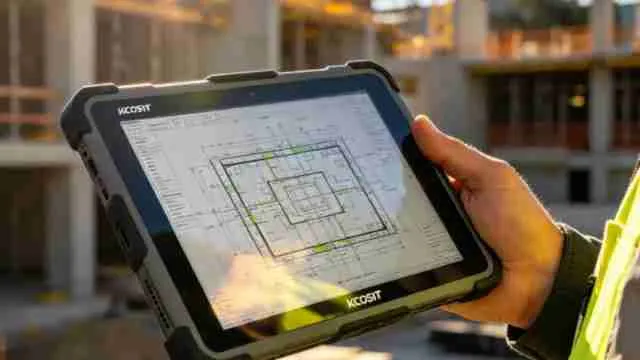
Take a tablet outside at lunch time and the problem shows up instantly. The screen may be on full brightness, but the page still looks washed, especially if the glass has fingerprints or the sun is bouncing from a white wall, car bonnet or pavement. This is why 500+ nits matters. It gives the tablet some extra headroom before the display starts looking tired in open light. The difference is felt most while reading small text, checking map turns, signing forms, showing a design sample or replying to work messages without standing under shade. It is not about making the screen flashy. It is about keeping the tablet usable when sunlight, reflection and glare are all working against it.
Why 500 Nits Is The Point Where A Tablet Starts Feeling Usable Outdoors?
A tablet screen is not judged properly inside a showroom or bedroom. The real issue starts when the same tablet is used outside, where light falls directly on the glass.
For normal indoor work, even 300 nits can do the job. Notes, videos, emails and browsing stay clear because the room light is controlled.
Near a bright window, 400 nits feels better. The screen may lose some punch, but reading and scrolling usually remain comfortable.
In direct afternoon sun, 500 nits becomes the safer mark. Below this, the user often starts tilting the tablet, increasing brightness again and again, or covering the screen with one hand.
That matters during real outdoor use: checking Google Maps, reading a PDF at a site, filling a form in a cab, showing a design sample, or replying to work messages while standing outside.
For long field work or outdoor shooting, more brightness is always useful. But for regular outdoor tablet use, 500 nits is where the screen stops feeling weak.
Which Type Of Tablet Screen Works Better Under Harsh Sunlight?
Not every outdoor user needs the same tablet screen. A student reading notes in a college garden, a delivery manager checking routes, and a designer showing colour samples outside will not face the screen in the same way.
For reading, forms and maps, a bright LCD with 500+ nits can work well because the main need is clear text and visible buttons. For reading, forms and maps, a bright LCD is usually enough. The job here is simple: the text should not disappear, and the tap buttons should remain easy to spot.
AMOLED makes more sense when the tablet is used for visuals. Photos, reels, product shots, colour samples and design previews look cleaner because the screen holds darker parts better.
For long outdoor reading, anti-reflective glass is the real comfort feature. It cuts that mirror-like layer on the screen, so the user does not keep hunting for the right angle every few minutes.
Tip: Match the screen to the work. Choose bright LCD for study and office use, AMOLED for visual work, and anti-reflective display for long outdoor reading.
To know more, visit our tablet category
Redmi Pad 2 Wi-Fi + Cellular, Active Pen Support, 27.94cm(11") Model, 2.5K Sharp & Clear Display, 6GB, 128GB, All Day & More 9000mAh Battery, AI-Enabled, Dolby Atmos, HyperOS 2, Sky Blue ₹19999₹19999
Why Automatic Brightness Cannot Always Handle Harsh Mid-Day Sunlight?
Auto brightness is helpful, but it is not a mind reader. It can sense how much light is around the tablet, but it cannot see what the user is struggling with on the screen.
That is why a tablet can go full bright and still feel unclear outside. The issue may be a glossy screen, a cheap screen guard, fingerprints, heat, or light bouncing from a white car, wall or pavement.
A large tablet can make this worse because more glass means more area for reflection. A small tablet has the opposite problem; maps, forms and PDFs may need more zooming when used outdoors.
Battery also takes a hit in this situation. The screen stays at high brightness, mobile data and GPS may stay active, and heat makes the tablet work harder than usual.
Even a simple fingerprint layer can make text look soft under sunlight. Before blaming the tablet, wipe the screen and remove a poor screen protector if it is making the display look cloudy.
Tip: For outdoor use, do not trust auto brightness alone. Keep manual brightness ready, use a clean screen, avoid cheap matte guards, and check real outdoor visibility before buying.
Why Text Size And App Layout Matter More On Tablets Used Outdoors?
Outdoor visibility is not only about how bright the tablet gets. It also depends on what is open on the screen.
A map with bold roads is easier to see than a PDF full of tiny text. A form with large boxes feels easier than a spreadsheet with thin lines and small numbers. Even at 500 nits, some apps are harder to use because their layout is not made for sunlight.
White backgrounds, grey text, small icons and thin fonts become the first things to disappear outside. This is why a tablet may feel fine for YouTube but annoying for invoices, forms, maps, stock sheets or editing dashboards.
Tip: For outdoor work, increase text size, use dark mode only when it improves contrast, zoom PDFs before reading and keep important apps on simple layouts. A bright screen helps, but readable content helps more.
Why Tablet Angle Matters More Than People Expect Under Sunlight?
A tablet can look clear one second and washed out the next, even without changing brightness. Many times, the problem is not the screen but the angle at which it is being held.
When the tablet is kept flat, it catches more open sky on the glass. That reflection spreads over the page, map or form and makes the display look pale.
A slight tilt can change everything. Pointing the screen a little away from the sky, wall or road reflection often makes text and buttons easier to see.
This matters more on tablets because the screen is large. More glass means more space for light to bounce back into the eyes.
Tip: While using a tablet outside, avoid holding it flat like a tray. Tilt it slightly down or sideways, clean the screen once, and then adjust brightness.
Conclusion
A tablet that feels perfect indoors can behave very differently under direct sunlight. That is why outdoor visibility is not decided by brightness alone. The screen, the glass, the app being used and even the way the tablet is held all play a role. A display above 500 nits simply gives the user a better chance of seeing what actually matters when there is no shade nearby.
Also Read:
Disclaimer: At Jagran Reviews, we prioritize providing up-to-date information on the latest trending commodities and goods. Links in this article are affiliate links. Please note that our product recommendations are based on independent research and analysis however, Jagran Reviews shall not be held liable for any claims, damages, or disputes arising under applicable laws, including the Consumer Protection Act, 2019. Any issues regarding product quality, delivery, or warranties must be directed to the respective manufacturer or seller. Furthermore, the products featured in this article are organized for reader convenience and are listed in no particular order of priority or ranking.